


SKU:PGA98H-XLR
The PG Alta series delivers professional sound quality at an affordable price, with solutions for recording almost any sound source, including voice, acoustic instruments, drums and amplified electric instruments.
Suitable for both live performances and studio recordings, PG Alta microphones are built to last and meet the same rigorous quality tests that make all Shure products reliable and trustworthy.
Good tips
- Do not cover any part of the microphone grille with your hand as this will negatively affect the microphone's performance.
- Point the microphone towards the desired sound source (such as a speaker, singer, or instrument) and away from unwanted sources.
- Place the microphone as close as practical to the desired sound source.
- Work close to the microphone for extra bass response.
- Use only one microphone to record a single audio source.
- Use fewer microphones for better gain before feedback.
- Keep the distance between microphones at least three times the distance from each microphone to its source ("three-to-one rule").
- Place microphones as far away as possible from reflective surfaces.
- Add a windscreen when using the microphone outdoors.
- Avoid excessive handling to minimize absorption of mechanical noise and vibration.
Phantom power
All condenser microphones require phantom power to operate. This microphone works best with a 48 V DC supply (IEC-61938), but can also operate with lower voltages. Phantom power is provided by the mixer or audio interface to which the microphone is connected and requires the use of a balanced microphone cable: XLR-to-XLR or XLR-to-TRS. In most cases, there is a switch or button to enable phantom power. Refer to the user manual for your mixer or interface for more information.
NOTE: This microphone is compatible with non-Shure bodypacks that have a TQG connector and supply 5V on pin 2.
Mounting the microphone
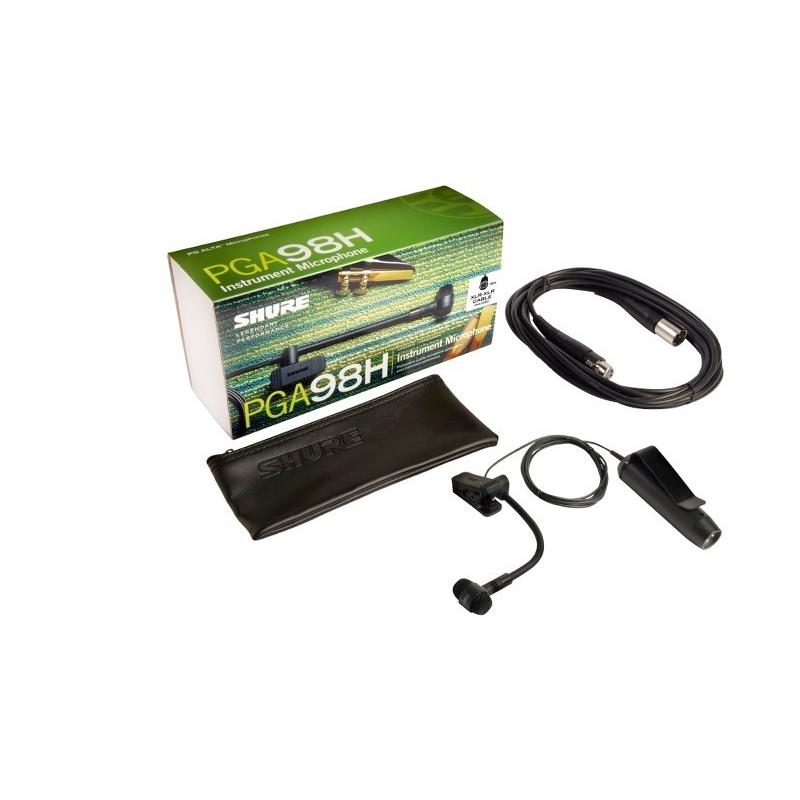
Use the integrated clamp to quickly and securely attach the microphone to horns or other instruments.
Squeeze the clamp to open it and attach it to an instrument or other object.
Align the microphone by turning the swivel base and bending the gooseneck.
Couldn't load pickup availability
🟢 Bestillingsvare – leveringstid ca. 3–7 hverdage

The PG Alta series delivers professional sound quality at an affordable price, with solutions for recording almost any sound source, including voice, acoustic instruments, drums and amplified electric instruments.
Suitable for both live performances and studio recordings, PG Alta microphones are built to last and meet the same rigorous quality tests that make all Shure products reliable and trustworthy.
Good tips
- Do not cover any part of the microphone grille with your hand as this will negatively affect the microphone's performance.
- Point the microphone towards the desired sound source (such as a speaker, singer, or instrument) and away from unwanted sources.
- Place the microphone as close as practical to the desired sound source.
- Work close to the microphone for extra bass response.
- Use only one microphone to record a single audio source.
- Use fewer microphones for better gain before feedback.
- Keep the distance between microphones at least three times the distance from each microphone to its source ("three-to-one rule").
- Place microphones as far away as possible from reflective surfaces.
- Add a windscreen when using the microphone outdoors.
- Avoid excessive handling to minimize absorption of mechanical noise and vibration.
Phantom power
All condenser microphones require phantom power to operate. This microphone works best with a 48 V DC supply (IEC-61938), but can also operate with lower voltages. Phantom power is provided by the mixer or audio interface to which the microphone is connected and requires the use of a balanced microphone cable: XLR-to-XLR or XLR-to-TRS. In most cases, there is a switch or button to enable phantom power. Refer to the user manual for your mixer or interface for more information.
NOTE: This microphone is compatible with non-Shure bodypacks that have a TQG connector and supply 5V on pin 2.
Mounting the microphone
Use the integrated clamp to quickly and securely attach the microphone to horns or other instruments.
Squeeze the clamp to open it and attach it to an instrument or other object.
Align the microphone by turning the swivel base and bending the gooseneck.